Introduction
If you’ve spent any time researching AI writing tools, you’ve probably come across HIX AI. It markets itself as an all-in-one AI platform, and with more than 120 tools bundled under one subscription, it’s easy to see why so many freelancers, students, and marketers are curious about it. But is it actually worth your money, or just another crowded AI suite trying to do too much at once?
This guide breaks down everything you need to know about HIX AI in 2026 — its features, pricing, pros and cons, supported platforms, and how it stacks up against alternatives — so you can decide if it fits your workflow.
What Is HIX AI?
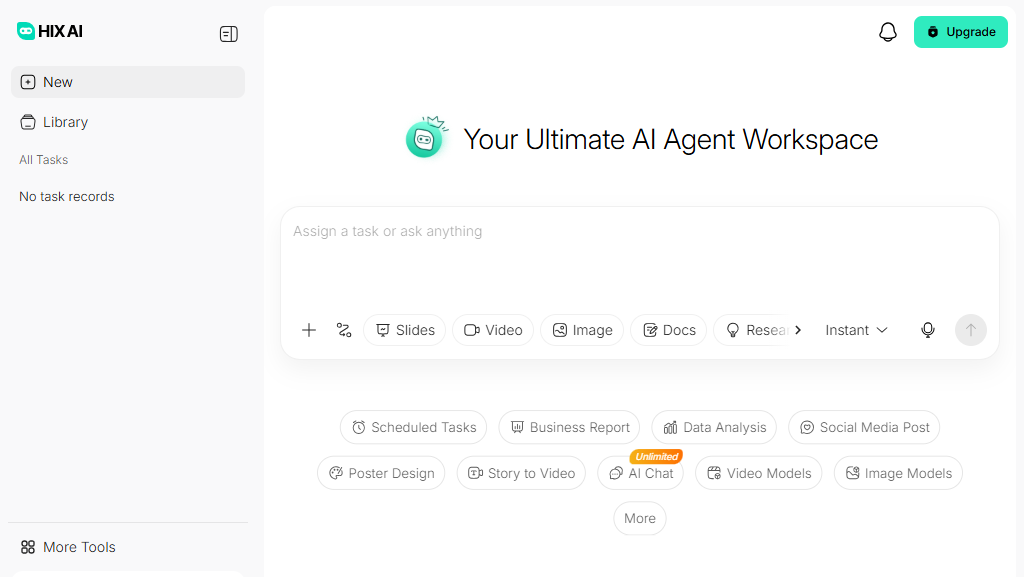
HIX AI is an all-in-one AI platform built around writing, communication, and productivity. Instead of offering a single chatbot or a single writing tool, it bundles dozens of specialized AI assistants into one dashboard — covering everything from blog posts and emails to academic papers and social media captions, in more than 50 languages.
Beyond plain text generation, HIX AI includes several standout modules: HIX Writer for everyday content creation, ArticleGPT for long-form blog articles, HIX Bypass for humanizing AI-generated text so it reads more naturally and is harder to flag as AI-written, HIX Chat as a general-purpose chatbot, and ChatPDF for summarizing and querying documents. There’s also BrowserGPT, a Chrome extension that brings AI assistance directly into Gmail, Google Docs, LinkedIn, and other web apps.
Key Features
- 120+ AI writing tools covering marketing copy, essays, emails, product descriptions, and more
- ArticleGPT for generating structured, long-form blog content
- HIX Bypass to humanize AI text and reduce AI-detector flags
- HIX Chat as a ChatGPT-style conversational assistant
- ChatPDF for summarizing and extracting insights from PDF documents
- Grammar checker, paraphraser, and text summarizer built into HIX Editor
- BrowserGPT extension for in-browser AI assistance on Gmail, Docs, LinkedIn, and Twitter/X
- Multilingual support across 50+ languages
- One-click WordPress export for publishing content directly from the editor
- Access to leading AI models, including GPT-4o-class models, depending on your plan
Benefits
Using HIX AI mainly saves you from juggling multiple subscriptions. Instead of paying separately for a writing assistant, a paraphrasing tool, a PDF summarizer, and a humanizer, you get them all in one place. This is especially useful for content teams and solo creators who need to move quickly across different formats.
The interface is also generally described as approachable, even for non-technical users like teachers and translators. And for SEO professionals and students who worry about AI-detection tools, HIX Bypass adds a layer of reassurance by rewriting AI output to sound more natural.
Pros & Cons
Pros:
- Wide range of tools under a single subscription
- Beginner-friendly interface
- Strong multilingual support
- Useful humanizing feature for AI-generated content
- Free plan available to test the platform before paying
Cons:
- Some users report the sheer number of tools feels overwhelming at first
- Output quality can be inconsistent for complex or highly technical writing
- Re-running prompts can eat into your word/credit allowance quickly
- Full access to every module (like HIX Bypass or the browser extension) often requires separate plans, not just one subscription
Pricing
HIX AI offers a free plan with limited daily credits so you can try the platform before committing. Paid plans vary depending on which product you subscribe to (AI Writer, AI Article Writer, HIX Bypass, etc.), since HIX AI doesn’t fold every module into a single flat-rate plan.
For its core writing tools, pricing has generally ranged from around $13–$20/month for a Pro-tier plan, up to around $30/month for an Unlimited tier with higher word/credit caps and access to more advanced models. Annual billing typically brings the effective monthly cost down. Because pricing and credit allowances shift periodically, it’s worth checking HIX AI’s official pricing page before subscribing.
System Requirements
HIX AI is primarily a cloud-based (web) platform, so there’s no heavy software to install. To use it, you generally need:
- A modern web browser (Chrome, Edge, Safari, or Firefox)
- A stable internet connection
- For the browser extension: Google Chrome or a Chromium-based browser
There are no demanding hardware requirements since all AI processing happens on HIX AI’s servers, not your device.
Supported Platforms
| Platform | Support |
|---|---|
| Web | Yes — full platform access |
| Windows | Yes — via web browser |
| macOS | Yes — via web browser |
| Android | Limited — mobile web access |
| iPhone (iOS) | Limited — mobile web access |
| Chrome Extension | Yes — BrowserGPT for Gmail, Docs, LinkedIn, X |
HIX AI doesn’t currently offer dedicated native desktop or mobile apps; it’s designed to be used through the browser and its Chrome extension.
How to Use HIX AI (Step-by-Step)
- Sign up for a free account on the HIX AI website using your email or a Google/social login.
- Choose a tool from the dashboard — for example, ArticleGPT for blog posts or HIX Chat for general questions.
- Enter your input, such as a topic, keywords, or a document you want summarized.
- Select your preferences, like tone, language, and content length.
- Generate the content and review the output.
- Edit or refine the text using HIX Editor’s grammar checker and paraphrasing tools.
- Run it through HIX Bypass (optional) if you want more natural, human-sounding phrasing.
- Export or publish — copy the text, download it, or use the one-click WordPress export.
Best Use Cases
- Drafting blog posts and long-form articles quickly
- Writing marketing copy, ad text, and social media captions
- Summarizing PDFs and research papers
- Rewriting or paraphrasing existing content
- Drafting professional emails
- Academic writing support, including proofreading and paraphrasing
Who Should Use It?
HIX AI is a good fit for content marketers, small business owners, freelance writers, students, and bloggers who need a broad toolkit without subscribing to five different apps. It’s less ideal for enterprises needing deep collaboration features, strict brand-voice training, or highly specialized technical writing, where more focused tools might perform better.
Alternatives
Some popular alternatives to consider include Jasper AI (strong for marketing teams), Writesonic, Copy.ai, and QuillBot (for paraphrasing specifically). For PDF and research-focused work, tools like ChatPDF standalone or Consensus are also worth comparing.
Feature Comparison Table
| Feature | HIX AI | Jasper AI | Copy.ai |
|---|---|---|---|
| Number of tools/templates | 120+ | 50+ | 90+ |
| AI humanizer | Yes (HIX Bypass) | No | Limited |
| PDF chat/summarizer | Yes (ChatPDF) | No | No |
| Browser extension | Yes | Yes | Yes |
| Free plan | Yes | Limited trial | Yes |
| Multilingual support | 50+ languages | 30+ languages | 25+ languages |
Pros & Cons Table
| Pros | Cons |
|---|---|
| All-in-one tool suite | Can feel overwhelming |
| Beginner-friendly | Output quality varies by task |
| Free plan to start | Credits deplete quickly on re-runs |
| Strong multilingual support | Some features need separate plans |
| AI humanizing feature | No native desktop/mobile app |
Pricing Table
| Plan | Price (approx.) | Best For |
|---|---|---|
| Free | $0 | Testing the platform |
| Pro | ~$13–$20/month | Individuals & freelancers |
| Unlimited | ~$29.99/month | Heavy users needing higher limits |
Pricing varies by product module and billing cycle; check HIX AI’s official site for current rates.
FAQs
1. Is HIX AI free to use? Yes, HIX AI offers a free plan with limited daily credits and access to a subset of its 120+ tools.
2. Does HIX AI support multiple languages? Yes, it supports over 50 languages for writing, translating, and rewriting content.
3. What is HIX Bypass? HIX Bypass is a tool that rewrites AI-generated text to sound more natural and human, helping it avoid detection by AI-content detectors.
4. Can I use HIX AI to write long blog articles? Yes, its ArticleGPT tool is specifically built for generating structured, long-form blog posts.
5. Does HIX AI have a mobile app? Not a dedicated native app — it’s accessible through mobile web browsers, and there’s a Chrome extension for desktop.
6. Can I publish content directly to WordPress? Yes, paid plans include one-click WordPress export from the HIX Editor.
7. Is HIX AI good for academic writing? It includes paraphrasing, grammar-checking, and proofreading tools that many students use, though you should always follow your institution’s AI-use policies.
Conclusion
HIX AI stands out for its sheer breadth — bundling dozens of writing, summarizing, and humanizing tools into a single, approachable platform. It’s a strong option if you want variety without juggling multiple subscriptions, particularly for bloggers, marketers, and students. That said, if you need deep, specialized functionality in just one area, a more focused tool might serve you better. The free plan makes it easy to test the waters before deciding if HIX AI earns a permanent spot in your toolkit.