If you’ve ever stared at a blank document, knowing exactly what you want to say but struggling to organize it into something readable, you’re not alone. That’s the exact problem Moonbeam AI was built to solve. In a market flooded with generic AI writing tools, Moonbeam has carved out a niche as a dedicated assistant for long-form content — essays, blog posts, articles, and reports. This guide breaks down everything you need to know about it, from its core features to whether it’s actually worth your money.
What Is Moonbeam AI?
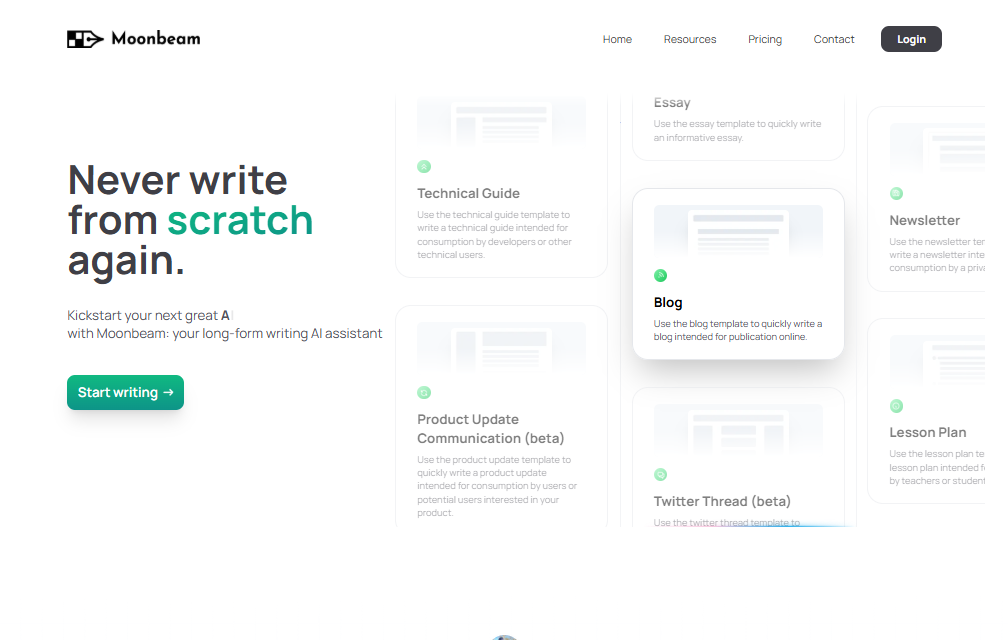
Moonbeam is an AI-powered writing assistant designed specifically to help people turn rough notes and half-formed ideas into polished, coherent long-form content. Unlike general-purpose chatbots that tend to lose focus or repeat themselves in longer pieces, Moonbeam was built from the ground up to maintain a consistent narrative and tone across entire documents.
At the heart of the platform is Luna, Moonbeam’s built-in AI writing engine. You give Luna a brief description, some scattered notes, or a topic idea, and it works with you to build an outline, expand it into full paragraphs, and refine the result through an interactive editor. The tool is popular with bloggers, content marketers, students, educators, and small business owners who need to produce quality written content without spending hours starting from scratch.
Key Features
Moonbeam packs in a handful of standout tools that set it apart from ordinary AI writers:
- Moonbeam Wizard – Converts messy notes or a simple prompt into a structured outline, then builds that outline into a full first draft, paragraph by paragraph.
- Smart Chat – A real-time chat assistant sitting alongside your document. You can ask it to explain a point, tighten a paragraph, brainstorm ideas, or fix awkward phrasing without leaving the editor.
- Custom Style Generator – Lets you write in a particular tone or voice, whether that’s a formal business style, a casual blog voice, or a style modeled after a well-known writing tradition.
- Content Clusters – Feed it a single keyword or topic, and it generates a batch of related content ideas and outlines, which is especially handy for content marketers planning out a publishing calendar.
- Collaboration Mode – Real-time, Google Docs–style co-editing, so teams can write and revise documents together.
- Advanced Text Editor – A clean, distraction-free writing space with built-in research and citation support to keep facts organized as you write.
Benefits
The biggest benefit Moonbeam offers is speed without sacrificing structure. Because it’s purpose-built for long-form writing, it tends to keep pieces focused and on-topic in a way that some general AI chat tools struggle with once a document stretches past a page or two.
It also lowers the barrier to entry for people who find writing intimidating. Students working on essays, small business owners writing website copy, and non-native English speakers can all use the Wizard to get a solid first draft without needing a background in writing or editing.
For content teams, the collaboration and content cluster features add real workflow value — instead of one person brainstorming topics alone, an entire team can plan, draft, and edit inside the same tool.
Pros and Cons
Pros:
- Strong at maintaining coherence across long documents
- Easy to use, even without prior writing or editing experience
- Useful built-in research and citation tools
- Real-time collaboration for teams
- Custom Style Generator adds creative flexibility
Cons:
- No permanent free plan — only a limited free trial
- Output quality can vary depending on how detailed your initial notes are
- The range of features can feel overwhelming for first-time users
- Pricing is on the higher side compared to some general-purpose AI writing tools
- Less suited to short-form content like social captions or ad copy
Pricing
Moonbeam runs on a freemium model. New users get a free trial to test the platform before committing. Beyond that, there are generally two paid tiers:
- Pro Plan – Around $49 per month, aimed at individual writers and creators, with unlimited long-form writing and full access to the editing and AI tools.
- Team Plan – Around $99 per month per seat, built for agencies and content teams that need real-time collaboration and shared workspaces.
Pricing details can shift over time, so it’s worth checking Moonbeam’s official website for the latest plans and any current promotions before subscribing.
How to Use Moonbeam AI
Getting started with Moonbeam is straightforward:
- Sign up for an account on the Moonbeam website and start your free trial.
- Start a new project and choose a content type — essay, blog post, article, or another format.
- Enter your notes or a topic prompt. The more detail you provide, the better your first draft will be.
- Let the Wizard build an outline, then generate the first draft section by section.
- Use Smart Chat to ask questions, request revisions, or get suggestions as you edit.
- Apply a custom style if you want a specific tone or voice for the piece.
- Edit and polish the draft in the built-in editor, then export or publish your finished content.
Best Use Cases
Moonbeam works best for:
- Bloggers and content creators who need to publish consistent, well-structured posts regularly
- Students and researchers organizing essays, papers, or reports
- Content marketers planning topic clusters and producing SEO-friendly articles at scale
- Small business owners writing website copy, newsletters, or service descriptions without hiring a copywriter
- Teams and agencies that need to collaborate on drafts in real time
It’s less suited for quick social media captions, one-line ad copy, or tasks where a shorter general-purpose AI tool would be faster.
Alternatives to Moonbeam AI
If Moonbeam doesn’t quite fit your needs or budget, a few alternatives are worth considering:
- Jasper AI – A broader marketing-focused AI writer with templates for ads, emails, and long-form content.
- Copy.ai – Geared more toward short-form marketing copy, with some long-form capabilities.
- Writesonic – Combines long-form article writing with SEO optimization tools.
- Rytr – A budget-friendly option for shorter content and simpler writing needs.
- ChatGPT or Claude – General-purpose AI assistants that can handle long-form writing with the right prompting, though they lack Moonbeam’s dedicated outlining and style tools.
Each of these has its own strengths, so the right choice depends on whether you need dedicated long-form structure (Moonbeam’s specialty) or broader marketing versatility.
FAQs
Is Moonbeam AI free to use? Moonbeam offers a free trial, but full access requires a paid Pro or Team subscription.
What kind of content can Moonbeam create? It’s built for long-form content: essays, blog posts, articles, reports, and similar formats. It’s not ideal for very short content like tweets or ad headlines.
Does Moonbeam produce plagiarism-free content? Moonbeam generates original drafts based on your prompts and notes, but as with any AI writing tool, it’s good practice to run final drafts through a plagiarism checker and fact-check any claims before publishing.
Can teams collaborate on Moonbeam? Yes. The Team plan includes real-time collaboration features similar to shared document editors.
Do I need writing experience to use it? No. The Wizard and Smart Chat features are designed to guide beginners through the writing process step by step.
Conclusion
Moonbeam AI fills a specific and useful gap in the crowded AI writing tool market: it’s built for people who need help producing coherent, well-organized long-form content rather than quick snippets. Its Wizard, Smart Chat, and Custom Style Generator make the writing process feel guided rather than overwhelming, and the collaboration features add genuine value for teams. It isn’t the cheapest option out there, and it may offer more firepower than casual users need, but for bloggers, marketers, students, and content teams producing long-form work on a regular basis, Moonbeam is a solid, purpose-built choice worth trying during its free trial before committing to a paid plan.