If you’ve ever felt overwhelmed juggling five different AI apps just to write a blog post, design a logo, and transcribe a podcast episode, you’re not alone. That’s the exact problem Easy-Peasy AI tries to solve. Instead of hopping between separate tools for text, images, audio, and video, it packs everything into one dashboard. But is it actually worth using, and does it live up to the hype? Let’s break it down.
What Is Easy-Peasy AI?
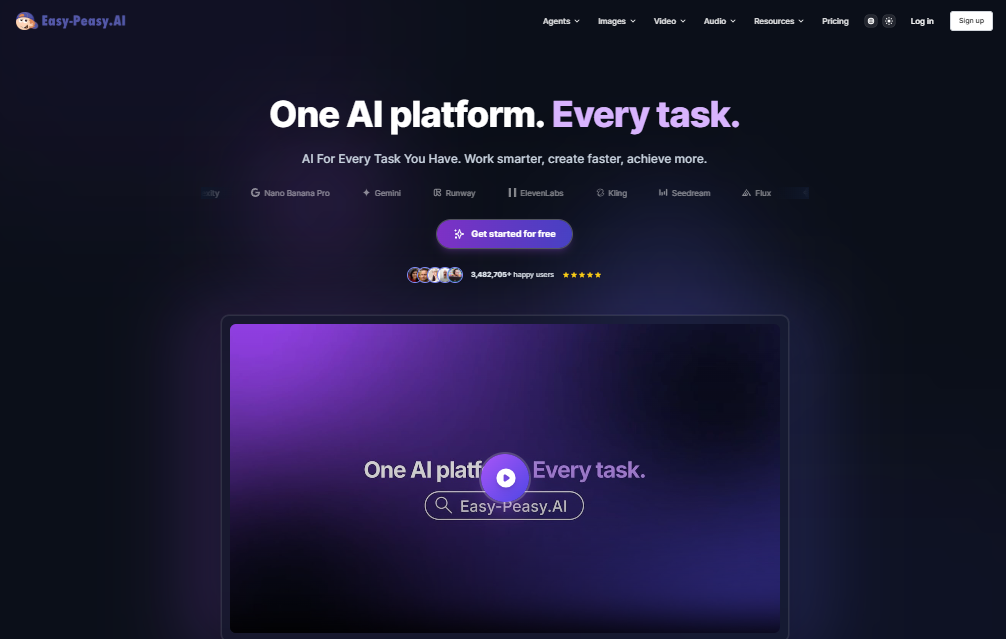
Easy-Peasy AI is an all-in-one AI content platform built for creators, marketers, freelancers, and small business owners who want to produce content faster without a steep learning curve. Instead of relying on a single AI model, it gives users access to a mix of leading models for writing, image generation, video creation, and audio transcription, all wrapped in one simple interface.
The platform is built around templates. Rather than starting from a blank page and figuring out the perfect prompt, you pick a template for whatever you need, like a blog outline, LinkedIn caption, email draft, or resume, and let the AI do the heavy lifting. With over 200 templates and support for more than 35 languages, it’s designed to feel approachable even if you’ve never used an AI writing tool before.
Beyond text, Easy-Peasy AI also includes an AI image generator, a video creation tool, text-to-speech, audio transcription, and even a built-in AI chat assistant. It’s essentially trying to be the Swiss Army knife of AI content tools.
Key Features
Here’s what you actually get when you sign up:
- 200+ ready-made templates covering blog posts, ads, emails, resumes, job descriptions, social captions, and more
- Multiple AI models to choose from for writing, so you’re not locked into one engine
- AI image generator with access to several top-tier models, multiple aspect ratios, and the ability to render text within images
- Video generation tools, including talking videos, image animation, and motion control
- Audio transcription and text-to-speech, useful for podcasters, students, and content teams
- Long-form editor with custom commands for more detailed, personalized writing
- AI chat companion for quick brainstorming or Q&A
- Brand voice customization so your content stays consistent across posts
- Content summarizer for condensing long articles or reports
- Team collaboration tools, including shared prompt libraries and workspace sharing on higher plans
Benefits
So what does this actually mean for you day to day?
It saves time. Because everything lives in one place, you’re not exporting from one app and importing into another. You can go from a blog outline to a finished post to a matching social graphic without leaving the dashboard.
It’s beginner-friendly. The template-based approach means you don’t need to know prompt engineering to get decent results. Just fill in a few fields and generate.
It’s genuinely multi-purpose. Freelance writers, marketing teams, students, and small business owners can all find something useful here, whether that’s a resume, an ad campaign, or a podcast transcript.
It scales with you. The free plan is enough to test the waters, and paid tiers scale up smoothly as your content needs grow, with more word counts, image credits, and bots.
Data protection matters. The platform states it follows global compliance standards like GDPR, and offers security practices aimed at enterprise-level trust, which matters if you’re handling client work.
Pros & Cons
| Pros | Cons |
|---|---|
| Combines writing, image, video, and audio tools in one platform | Free plan images are public, which limits privacy |
| Over 200 templates for a wide range of content types | No parallel task execution on the free tier |
| Multiple AI models to choose from | Pricing structure can feel confusing with several tiers and credit systems |
| Beginner-friendly interface, no prompt skills required | Some advanced features are locked behind higher-tier plans |
| Supports 35+ languages | No dedicated mobile app mentioned |
| Reasonably priced compared to buying separate AI subscriptions | Free plan word/image limits are fairly small |
Pricing
Easy-Peasy AI uses a freemium model, meaning you can start for free and upgrade as needed. Based on current published pricing:
- Free Plan – around 1,000 words, a small number of image credits, one audio transcription, limited text-to-speech characters, one bot, and access to 170+ templates. No credit card required, though generated images are public on this tier.
- Starter Plan – roughly $8/month (billed yearly) with a significantly higher word allowance, more image and video credits, more transcriptions, multiple bots, brand voice options, and access to 200+ templates.
- Unlimited/Popular Plans – starting around $12–$28/month depending on the tier, offering unlimited access to standard AI models, higher word caps on premium models, more image credits, additional bots, priority support, and API access.
- Custom/Enterprise Plans – available for teams and larger organizations that need tailored limits and support.
Yearly billing typically comes with a discount compared to paying month to month, so if you know you’ll use it long-term, that’s the better deal. Since pricing and credit allowances shift periodically as new AI models are added, it’s worth checking the official pricing page before you commit.
How to Use Easy-Peasy AI
Getting started is genuinely simple:
- Sign up using your email, Google, or Facebook account. No credit card is required for the free plan.
- Choose a template based on what you need, such as a blog post, product description, or social media caption.
- Enter your prompt or details, like a topic, tone, target audience, or keywords.
- Generate your content and review the output in the editor.
- Edit and refine using the long-form editor, custom commands, or by regenerating specific sections.
- Export or publish your finished content directly, or pair it with the image and video tools to build a complete content package.
If you want a smoother experience, keep your prompts specific. The more detail you give (audience, tone, length, purpose), the more usable the first draft will be.
Best Use Cases
Easy-Peasy AI tends to shine in situations like:
- Bloggers and content marketers who need consistent output without hiring a full team
- Freelancers juggling client work across writing, design, and social media
- Small businesses that need marketing content, product descriptions, or ad copy on a budget
- Job seekers creating resumes, cover letters, and LinkedIn summaries
- Podcasters and video creators who need transcription, text-to-speech, or quick video content
- Students and researchers summarizing long articles or reports quickly
Alternatives
If Easy-Peasy AI doesn’t quite fit your workflow, a few solid alternatives worth comparing include:
- Jasper – strong for enterprise marketing teams with more advanced brand controls
- Writesonic – another all-in-one content generator with SEO-focused features
- Simplified – geared more toward social media content and design
- Copy.ai – good for short-form marketing copy and sales content
- ChatGPT – a general-purpose AI model without built-in templates, offering more flexibility but less structure
FAQs
Is Easy-Peasy AI free to use? Yes, there’s a free plan that includes a limited word count, a few image credits, one audio transcription, and access to a large template library. No credit card is needed to sign up.
What’s the difference between Easy-Peasy AI and ChatGPT? ChatGPT is a general-purpose AI model you have to prompt manually. Easy-Peasy AI is built on top of models like GPT and others but packages them with ready-made templates, making it faster for specific, repeatable tasks like blog posts or ads.
Does Easy-Peasy AI offer an API? Yes, API access is available, typically on higher-tier plans.
Is the content generated by Easy-Peasy AI original? The platform states its output is designed to read naturally and avoid detection by common AI checkers, though as with any AI tool, it’s a good idea to review and personalize the final draft.
Can I use Easy-Peasy AI for languages other than English? Yes, it supports more than 35 languages across its templates and writing tools.
Is there a mobile app? Currently, there’s no widely advertised dedicated mobile app, so it’s primarily used through a web browser.
Conclusion
Easy-Peasy AI earns its name by making AI content creation genuinely approachable. It won’t replace a full creative team, and power users may eventually outgrow its template-driven approach, but for freelancers, small businesses, and everyday content creators, it offers a lot of value in one place. The free plan is a low-risk way to test it out, and the paid tiers are reasonably priced compared to stitching together separate subscriptions for writing, images, and audio tools. If you want an easy on-ramp into AI-assisted content creation without a steep learning curve, it’s worth a try.